
Here is a claim most vendors will not like: changing the background and adding a logo is not customization. It is decoration. Real custom photo booth software lets you change what happens on the booth, not just how it looks. You should be able to decide which screens a guest sees and in what order, what each kind of session costs, which printer each design goes to, and what the booth does when something fails.
This photo booth software comparison judges the main tools on exactly that. Below is a framework for judging customization, an honest look at how far each tool goes, and where ours goes further.
The five layers in this photo booth software comparison
Customization is easier to compare, though, when you split it into layers. However, most demos show you the first one and skip the rest.
| Layer | What customizing it means | Ask this in a demo |
|---|---|---|
| Look | Backgrounds, logos, fonts, colours, button styles | Can I brand every screen, not just the start screen? |
| Flow | Which screens appear, in what order, and what each button leads to | Can I add, remove or reorder screens myself? |
| Capture | Stills, GIFs, boomerangs, filters and countdowns | Can the guest choose, or do I have to pick one per event? |
| Strip layouts, sizes and which printer handles each design | Can one booth print two sizes on two printers? | |
| Payment and delivery | Prices per session type, card readers, text, email and QR | Can a GIF cost less than a print session? |
In fact, look is the layer everyone has solved. Flow and payment are where the real differences sit, especially for a booth that runs without an attendant.
Photo booth software comparison: what each tool lets you change
To be fair to the competition, every serious tool now covers the look layer well, and several go further. Here is what each vendor documents.
- LumaBooth for Windows (formerly dslrBooth). A Screen Editor for the welcome, capture and sharing screens, plus a Print Layout editor. Its dashboard advertises more than 820 ready-made templates. Their layout guide shows the editor.
- Snappic. A Template Designer that works in layers, and App Experience settings for branded screens, overlays and attract screens. It is an iPad product, so the strength is sharing rather than printing.
- Sparkbooth. A drag-and-drop layout creator on its Premium and DSLR licences, start screen settings, and translatable prompts for multilingual events.
- Breeze Booth. The deepest of the established tools. Its touchscreen editor lets you define actions for specific areas of each screen, with multi-language and multi-profile setups. However, that power comes through configuration rather than a visual map, so it rewards operators who enjoy tinkering.
In short, if your idea of customizing is branding the screens and designing a strip, any of these will do. Our best photo booth software guide matches each one to the job it suits.
If your booth has to run alone and take money, keep reading, or download VertexBooth and test the deeper layers yourself.
Where customization usually stops: the guest flow
Most software, however, gives you a fixed sequence and lets you decorate it. VertexBooth treats the sequence itself as something you build. Every screen a guest can see sits on one map, with arrows showing which button leads where. Consequently, you can add a screen, reorder the steps or change where the session starts without hunting through menus.

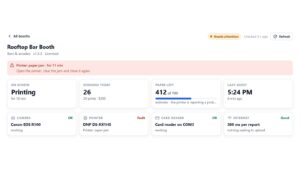
The flow also covers the moments nobody demos. There are screens for a declined card, a closed booth, a disconnected camera and a disconnected printer, and each can be designed like any other. You can keep screens outside the main flow too, such as a sponsor thank-you. On a digital-only night, the print screens drop out of the sequence on their own.
Customizing what each session costs
For an unattended booth, payment is part of the experience, so it should be customizable too. In VertexBooth, a photo session, a GIF and a boomerang can each carry their own price. Card readers connect over MDB, the protocol vending machines already use, and if a print fails the charge is voided. Our post on connecting a Nayax reader covers the hardware side.
Customizing the print, down to the printer
First, the strip builder works like a small design tool. You can align, snap to a grid, use guides, rotate, resize and reorder layers. It also checks the design against the real screen or sheet, and warns you when something such as a QR code runs past the edge.
Beyond that, one booth can hold more than one printer. Each design can name the printer it belongs on, so 2×6 strips and 6×8 prints can run on the same night. Our photo booth strip design guide covers sizes and bleed.

See how far the customization goes on your own machine
VertexBooth installs free with every feature switched on. Build your screens, design your strips and wire up your reader before you pay anything. The only difference until you licence it is a watermark on each photo.
Customization you can measure
Still, most customization is guesswork: you design something and hope guests like it. The more useful kind is driven by what guests actually do. The VertexBooth dashboard shows which designs and filters people chose, by session. As a result, a filter nobody picks stops being a matter of taste. It becomes a button you can remove to make the first decision faster.
AI filters also follow the same thinking. They run on your own API key, so you decide which effects to offer and the provider bills you directly, without any margin added by us.
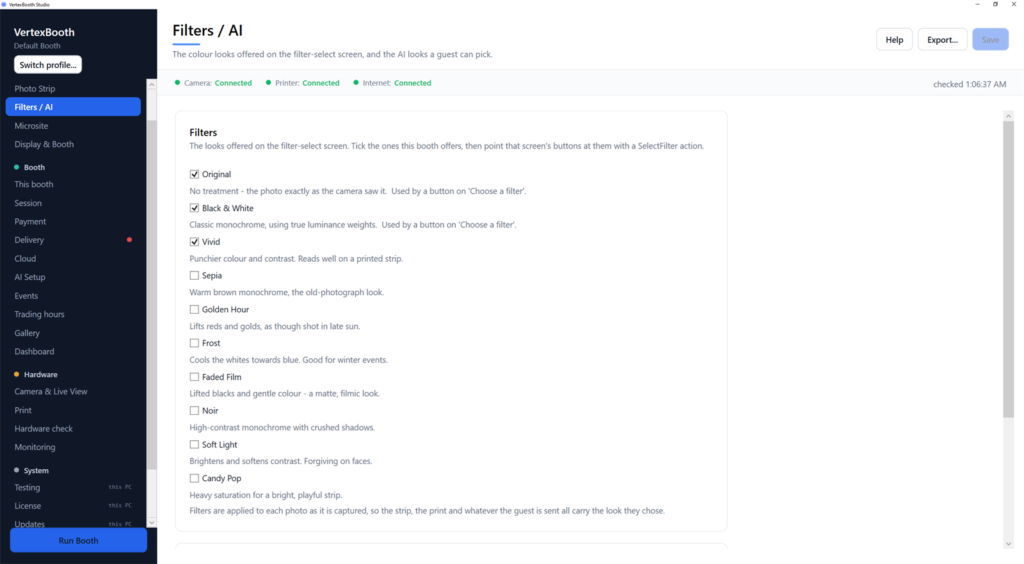
Photo booth software comparison questions
Which photo booth software is the most customizable?
It depends on the layer. Breeze offers the deepest touchscreen logic, LumaBooth and Snappic have the largest template libraries, and VertexBooth lets you rebuild the guest flow, pricing and print routing visually. Decide which layer matters for your booth first.
Do I need design or coding skills to customize a booth?
No. Every tool covered here uses visual editors for screens and layouts. Logic is where they differ: some use configuration settings, while VertexBooth shows the flow as a map you edit directly.
Does more customization cost more?
Not necessarily. VertexBooth is $250 once at its early access price. Sparkbooth Premium is $149 once, Breeze Remote Pro is $349 once, and LumaBooth for Windows is $17 a month on an annual plan.
Can I customize a booth that runs without staff?
Yes, and that is where flow and payment customization matter most. Design the error screens as carefully as the welcome screen, because nobody is there to explain a declined card.
So which layer is your booth actually missing? If it is the look, any tool on this list will fix it. If it is the flow, the pricing or what happens when something breaks, see the full VertexBooth feature list, or, for venue owners who want the booth without the software, see how our permanent photo booth installation in Florida works.