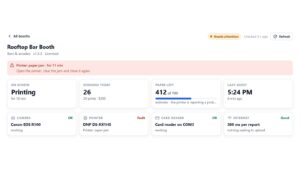


Most vending machine management software is built for machines that sell cans of soda, and it shows. It counts stock, plans restocking routes and reconciles cash. A photo booth has no stock to count. Instead, it has a camera, a printer, a card reader and a guest standing in front of it. Managing one well therefore means something different: knowing each booth is taking guests, fixing it from where you are, and seeing what it earned without logging in anywhere.
That is the job VertexBooth 1.3.0.0 takes on. This post walks through a normal day of running booths with it, from the morning check to the monthly numbers. That way you can judge whether it fits the way you already work.
Why photo booths need different vending machine management software
Snack vending software answers “what needs refilling, and where do I drive next?” For photo booths, however, refilling is one roll of paper every few hundred prints. The questions that cost money are different:
| Snack machine question | The photo booth version |
|---|---|
| Which slots are empty? | How many prints are left on the roll? |
| Is the coin mech jammed? | Is the card reader answering, and are cards being declined? |
| Has the machine sold anything? | When did the last guest use it, and is its screen even on? |
| Can I change a price remotely? | Can I pause, restart or reset it remotely? |
| What did each machine take? | Sessions, prints and card takings per booth, per day |
Every row on the right is something VertexBooth now reports or does from a web page, with nothing extra to install and no server to run.
The morning check
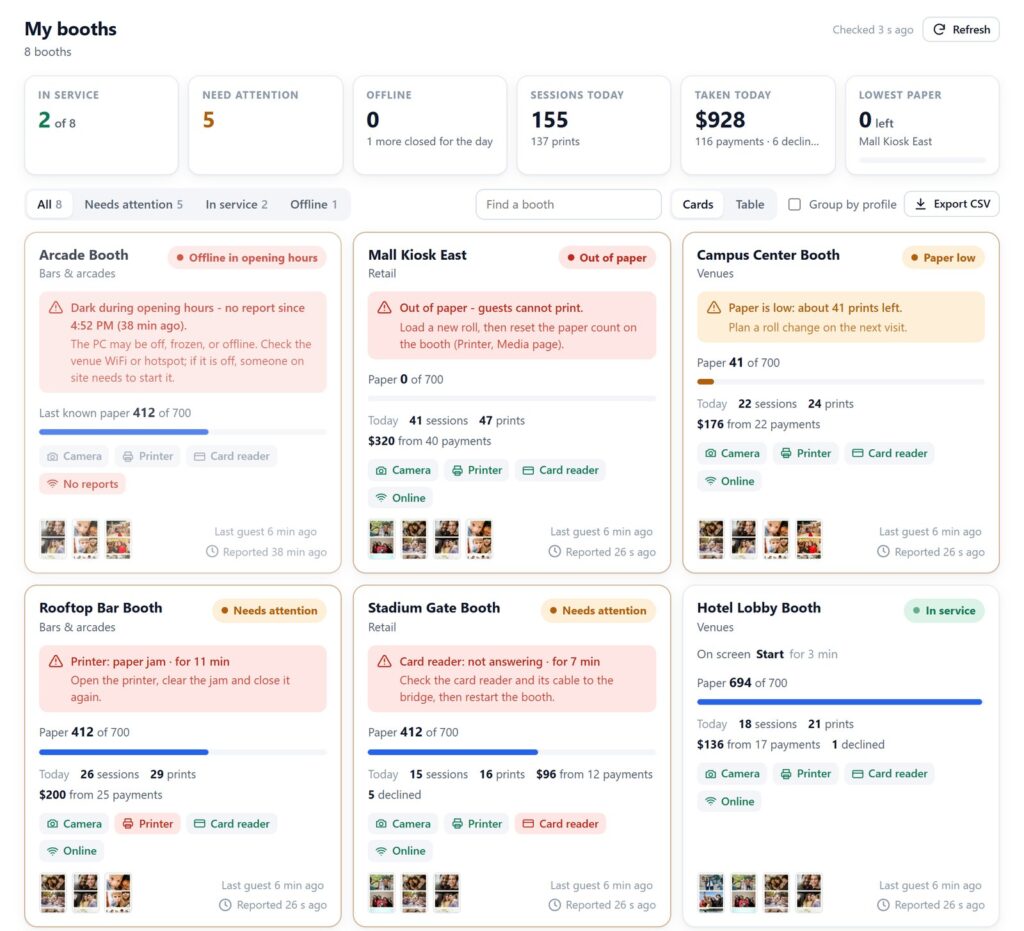
Open the fleet monitor. Booths that need you are sorted to the top, each with one plain sentence about the problem and when it started. A summary above them shows how many booths are in service, which one has the least paper, and today’s sessions and takings so far.
If a booth is dark because its venue has not opened yet, it reads as “Closed until” its opening time rather than as a fault. As a result, the list only shows you real problems. For a large fleet, switch to the table view and group booths by profile, which usually means by client or venue type.
The midday fix
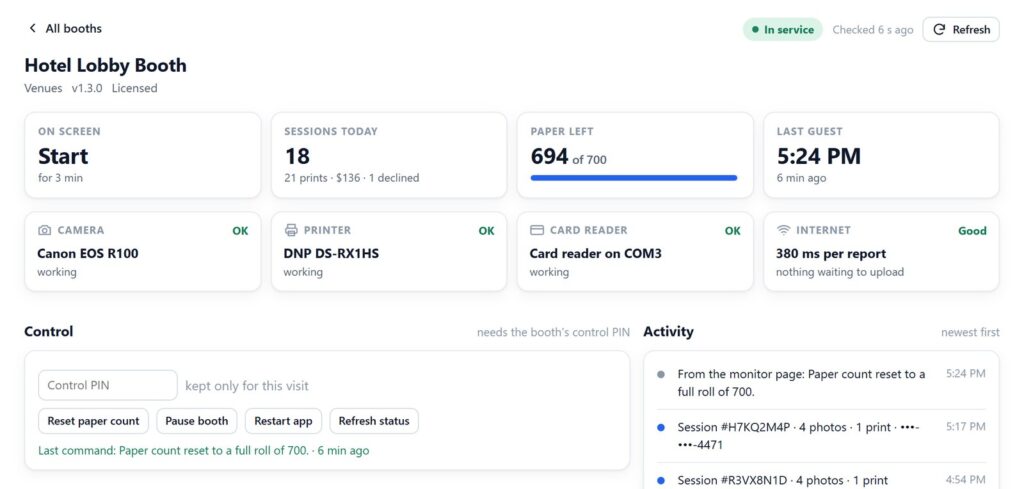
A venue manager calls: the booth has gone quiet. Open that booth’s page. It shows what is on its screen, each device’s state, the internet connection, and the last few things that happened. Then, if it simply needs a restart, press Restart app. If it needs a new roll, talk the manager through loading one, then press Reset paper count so the estimate starts again.
These buttons need a control PIN you set in Studio, so anyone you give the monitor link to can look but not act. Commands travel through ntfy, the same free service the phone alerts use, and the booth picks them up on its next health check, usually within a minute. A restart waits if a guest is using the booth. A pause waits for the current guest to finish.
Run the midday fix at your desk first. Set a control PIN, open the monitor on your phone and pause a test booth from across the room. Download VertexBooth to try it with the full feature set.
Pausing a booth on purpose
Pause is not only for faults. For example, a private event wants the booth closed for an hour, or a venue is cleaning the area. Sometimes a pop-up has simply run out of its paid window. Pause takes the booth out of service and stops asking for payment. It stays paused until you press Resume, even if a device recovers underneath it, which is how it should behave: you paused it, so you decide when it comes back.
The end of the day
Every booth sends in its day of sessions, prints, card payments, takings and declines, straight from its own records. The fleet summary then adds them up. If you share the monitor with a venue partner, you can switch takings off first, so they see how busy the booth is without seeing the money.
Declines deserve their own look. One declined card is the guest’s card. Several in a short time usually means the reader, its cable or the payment account, and VertexBooth now sends an urgent alert after three declines in ten minutes. For how the card reader side fits together, our guide to the Nayax card reader covers the hardware.
The monthly numbers
Export the fleet as a CSV from the monitor page. It lists every booth with its status, any problem, today’s sessions, prints, takings and declines, paper left, devices, last guest and app version. Since the file is built in your browser, nothing is sent anywhere. Open it in Excel or Google Sheets and it becomes the start of a monthly report for each client.

What it deliberately does not do
It does not plan routes, track inventory or replace your accounting. Plenty of good software does those things, and a photo booth operator with five machines does not need them. It also cannot fix hardware from a distance, of course. A jammed printer still needs a person. What it removes is the drive you make just to find out what is wrong, and the call you make just to press a button.
Vending machine management software questions
Does VertexBooth work with vending machines that are not photo booths?
No. It is photo booth software, and the monitoring and remote control are built around a booth’s camera, printer, paper and card reader.
Is there a monthly fee for the monitoring and remote control?
No. Both are part of the software. The monitor runs from your own cloud storage, which usually stays inside Cloudflare’s free allowance, and remote commands go through the free ntfy service.
Can staff see the monitor without being able to change anything?
Yes. Share the monitor link for viewing. The Pause, Restart and Reset buttons only work with the control PIN, which you keep.
How quickly does a remote restart happen?
Usually within a minute. The booth checks for commands on its health check, then restarts and reports back, and the page shows the result under Last command.
If there is a button you would want on that page that is not there yet, tell us; the VertexBooth roadmap is where requests like that end up. For everything else the software does, see the VertexBooth software page; ntfy’s own site explains the alert service, and venues can read about permanent photo booth installation.