
Picture it: the bride’s grandmother steps up to the booth, taps the big button because someone told her to, and suddenly has ten seconds and a camera pointed at her. She says the couple’s names, tells them to be kind to each other, and walks off before the clip has finished. Nobody else at the wedding will say anything better. That clip is the whole reason a video guest book booth exists, and until recently most photo booth software treated it as an afterthought.
A video guest book booth is a booth where guests record a short message with sound instead of, or as well as, posing for photos. The couple, the company or the venue walks away with every message from the night. As of VertexBooth 1.3.0.0, video is a full session kind inside our Windows software, beside photos, GIF and boomerang. This post covers how to set one up so it actually gets used.
What a video guest book booth needs to do well
Recording a clip is the easy part. Webcams and DSLRs have been able to do that for years. The hard parts are everything around it. The guest needs to know when it is recording, and the sound needs to be usable in a loud room. Then the host needs the clips afterwards, without anyone copying files off a laptop at midnight.
So judge any setup on the full path, not on the recording screen. A guest taps, sees one countdown, records, and moves on. The clip is converted into an ordinary MP4 file that plays on any phone. The guest can have it sent by text, email or QR code. Then, after the event, the host gets one tidy download of every message.
One countdown, then the clip
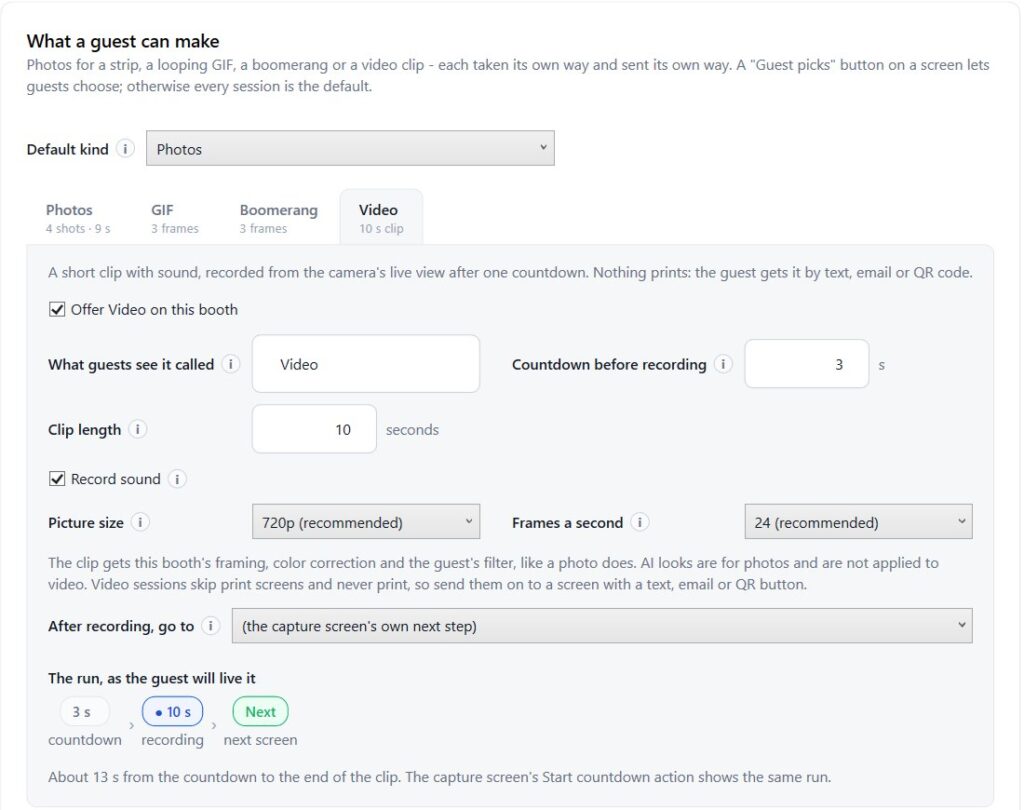
In VertexBooth a video session runs one countdown and then records for a set length, 10 seconds out of the box. You can change the length under Session, although the software warns you once you go past 30 seconds. We think that warning matters. Long clips sound generous on paper, yet in practice guests run out of things to say, the queue grows, and the best messages were always the short ones.
Sound that survives a dance floor
The clip records sound from the booth’s microphone along with the picture. That is also where most video guest books fail, so place the booth where a guest can hear themselves think. A corner away from the speakers does more for audio quality than any setting. If the room is simply too loud, switch sound off and let the booth record silent clips. Those still work well for waves, dances and signs held up to the camera.
Setting up video sessions in VertexBooth
Video is off by default, because a booth that suddenly offers something new at an event is not a booth anyone planned for. Switch it on under Session, then decide how guests reach it. You have two common layouts.
- Video only. The start screen leads straight into a recording. This is the classic format, and it suits weddings, milestone birthdays and retirement parties.
- A choice. A screen asks the guest whether they want photos, a GIF, a boomerang or a video. Each option is a button that picks the session kind, and the rest of the flow follows from that choice.
Everything that applies to photos applies to video too. Framing, color correction, filters and, on the free trial, the watermark are drawn onto every frame of the clip. As a result, a video looks like it came from the same booth as the prints.
A video session never prints
There is nothing to print from a video, so the booth walks past the printing screens for that session exactly as it does on a digital-only night. You do not need a second flow for video guests. However, the printing screen should not be the only place a guest learns how to get their clip. So make sure your sending screen offers text, email or a QR code.
Try a video session before your next wedding. The full software runs free with a watermark, so you can record, send and download real clips at your desk first. Get VertexBooth and switch video on under Session.
Getting the clips to guests and to the host
Guests want their clip immediately. Hosts want all of them later. These are two different jobs, and a good setup handles both without anyone touching a USB stick.
For the guest, a clip goes out the same way photos do. A text message carries a link to the guest’s own page, where the video plays. Email can attach the clip itself, and the booth tells you when a clip is too large to attach. A QR code on screen opens the same page on the guest’s phone. If you connect your own Cloudflare R2 storage, those pages stay online for weeks after the event rather than only while the booth is on the venue’s WiFi.
For the host, VertexBooth 1.3.0.0 adds Event download. In Studio, open Gallery and choose Download. You can pack one event, a date range or everything into a single zip, choose what goes in it, and choose how it is arranged. For a wedding, that zip is the video guest book. Hand it to the couple the morning after and the job is finished.
Where video guest books go wrong, and how to avoid it
We have watched a lot of guests in front of a lot of booths. The failure points are consistent enough to plan around.
| What goes wrong | Why it happens | What to do instead |
|---|---|---|
| Guests freeze on camera | They do not know what to say | Put a prompt on the start screen, such as “Tell the couple your best advice” |
| Half the clip is silence | The clip is too long | Keep it at 10 to 15 seconds |
| Nobody can hear the message | The booth sits next to the speakers | Move it, or record silent clips and ask for signs and waves |
| The host never gets the files | Clips live only on the booth PC | Use Event download the next morning |
| Guests expect a print | The flow looks like a photo booth | Say “video message” on the start button, not “start” |
The prompt is the one we would never skip. A blank camera is intimidating. A single question on the screen turns a nervous guest into a funny one, and that is the difference between a folder of good messages and a folder of awkward silence.
Does it need a special camera?
No. The clip is recorded from the booth’s live view, so the same webcam or camera that takes your photos records the video. In other words, if your live view looks good, your clips will too. For video specifically, a well lit subject matters more than a better lens. Soft, even light from the front makes every clip look professional, even from a good webcam.
The software converts every clip to MP4 using the encoders already built into Windows, so there is nothing extra to install. If a clip ever refuses to play on the booth’s own screen, the booth shows a still frame from it rather than a broken player.
Video guest book booth questions
How long should a video guest book message be?
Ten to fifteen seconds. Long enough for a sentence or two, short enough that guests do not run out of words and the queue keeps moving. VertexBooth defaults to 10 seconds and warns you past 30.
Can guests choose between a photo and a video?
Yes. Add a screen with one button per session kind. Each button picks photos, a GIF, a boomerang or a video, and the booth follows the right path from there.
How does the couple get every video after the wedding?
Open Gallery in Studio and choose Download. Pick the event, choose what to include, and the software packs every clip into one zip you can hand over.
Do video sessions use the printer?
No. A video session skips the printing screens entirely, the same way a digital-only session does, so paper and ink are only used for photo sessions.
If you already run video sessions, what is the one prompt that gets your guests talking? Tell us, because we are still collecting good ones. If you are setting one up for the first time, the VertexBooth software page covers the rest of what the booth can do, while our guide to boomerang photo booth software covers the other moving format. Venues looking for a booth that lives on site full time can read about permanent photo booth installation.