

Vending machine remote monitoring means seeing, from anywhere, whether each machine is working, what it has sold and what it needs, without driving to it. For a snack machine, for example, that is mostly stock levels. For a photo booth vending machine it is a longer list: the camera, the printer, the paper, the card reader, the internet connection, and whether anyone has actually used it today.
VertexBooth 1.3.0.0 turns that list into one private web page for every booth you run. This post covers what a good monitoring page has to answer, how ours works, and the questions to ask of any system before you trust it with machines you cannot see.
What vending machine remote monitoring should tell you
A monitoring page earns its place by answering the questions you would otherwise drive over to answer. For an unattended photo booth, those are:
- Is it on, and is it taking guests right now?
- If something is wrong, what is it, and since when?
- How much paper is left?
- Can people pay?
- When did the last guest use it?
- What has it taken today?
The last two are the ones most systems miss. A booth can be switched on, online and technically healthy while earning nothing, because its screen went dark or it ended up behind a pillar. “Online” is not the same as “working”, and a page that only reports the first will tell you everything is fine on a day you made nothing.
How the VertexBooth fleet monitor works
Each booth writes a small status file to your own cloud storage about once a minute. A self-contained page in the same storage reads those files and draws your fleet. Nothing connects to the booth directly. That matters, because booths sit behind venue WiFi and phone hotspots, and a page that has to reach into the booth fails exactly when the network is bad.
The fleet view
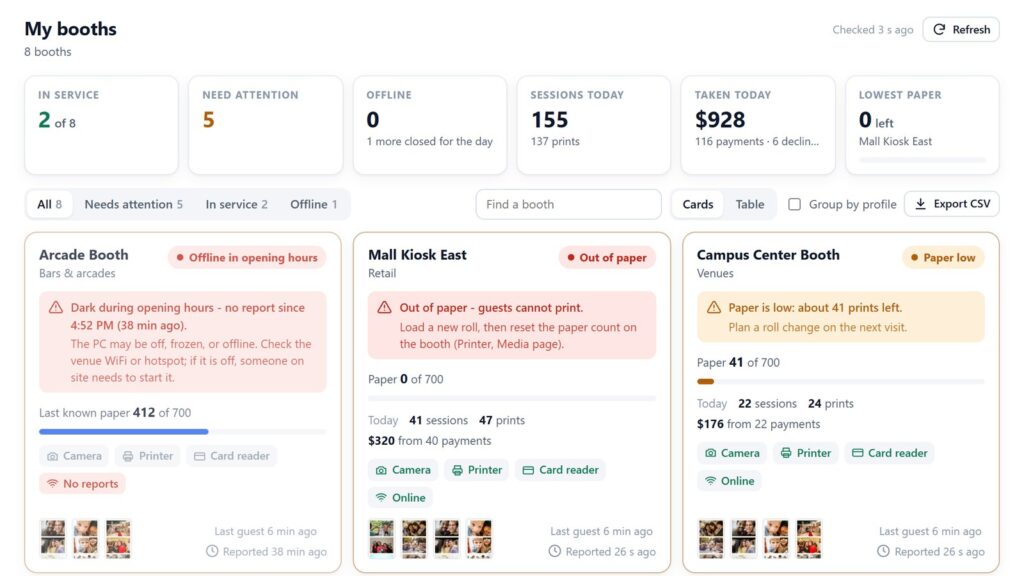
Every booth gets a card, with anything needing attention sorted to the top. A card shows the booth’s status in plain words, what is on its screen and a paper bar. It also shows its devices, today’s sessions and takings, when the last guest used it, and small thumbnails of its latest strips. Meanwhile, a summary above the cards shows how many booths are in service, how many need you and how many are offline. It also totals today’s sessions and takings, and names the booth with the least paper.
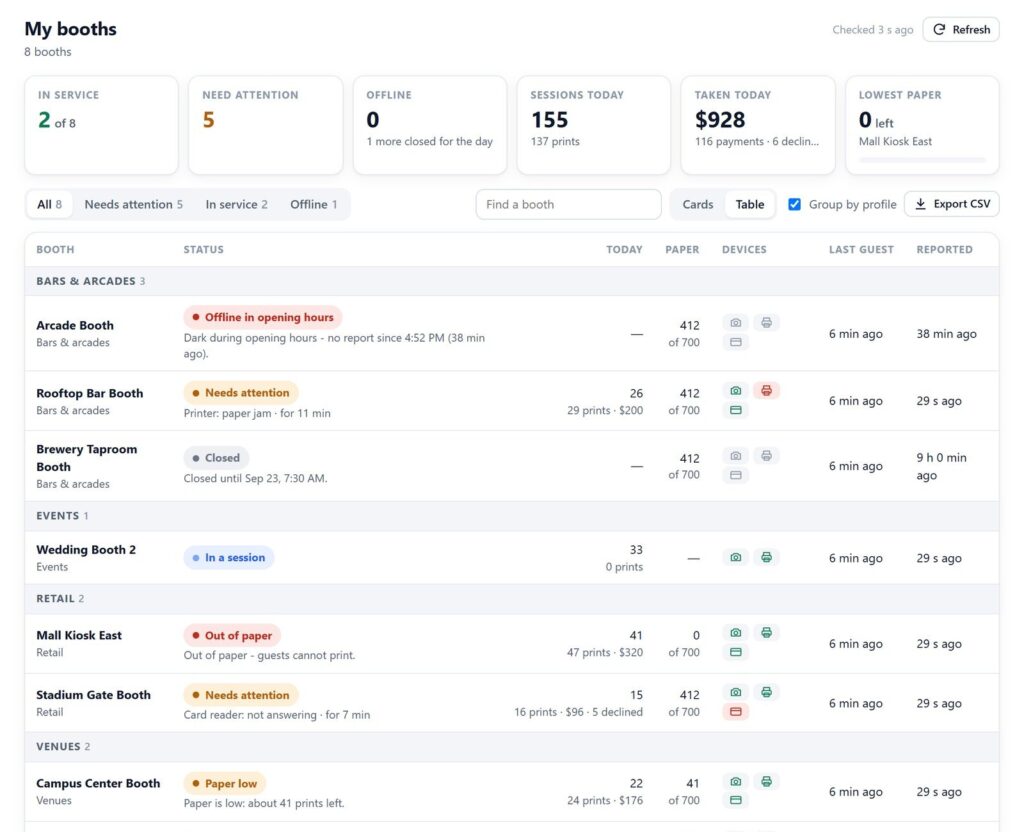
For bigger fleets you can switch to a table, group booths by profile, search by name and export a CSV. The page slows its own refresh as the fleet grows, so leaving it open on a screen all day does not run up your storage bill.
The booth view
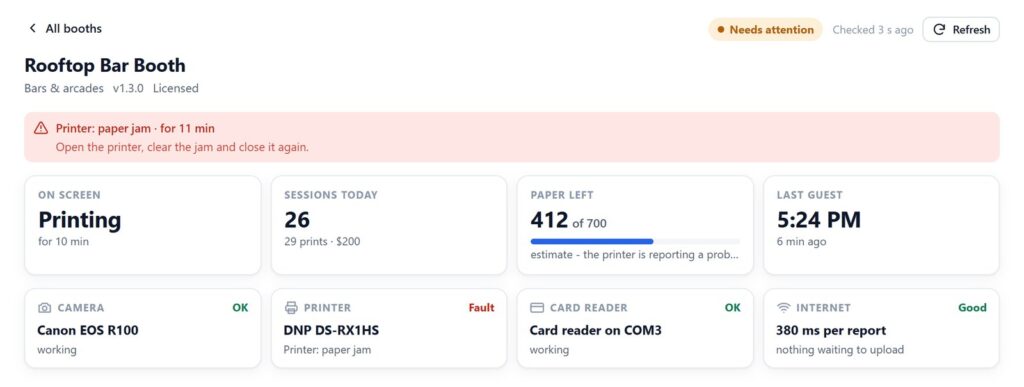
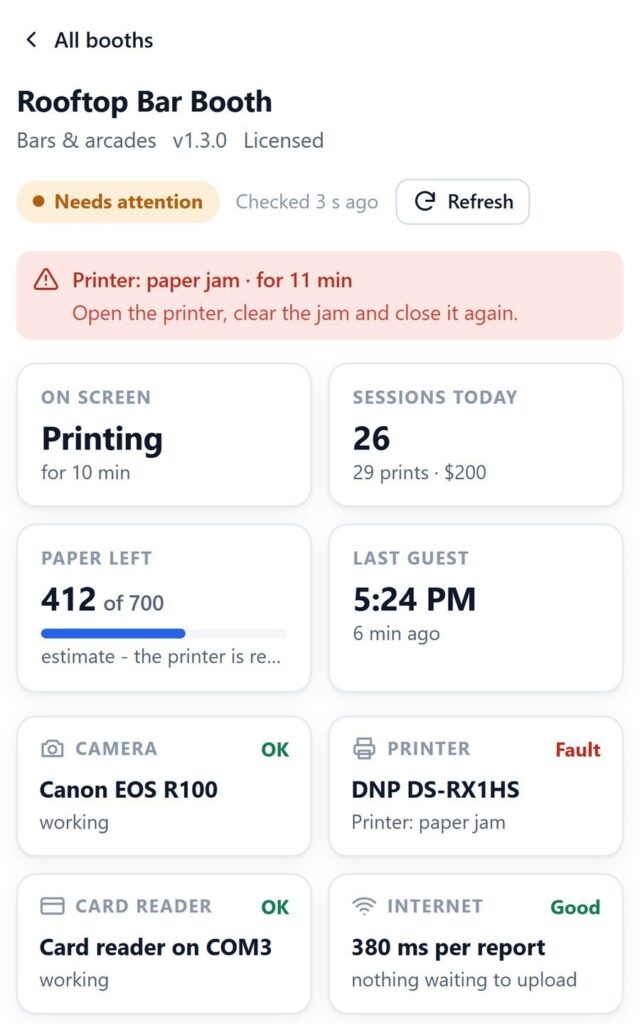
Click a card and you get that booth’s detail, with a back arrow to the list. First, it shows what is wrong, for how long, and a line on what to do about it. Then come each device, the internet connection and recent activity. Finally, every recent session is listed with its strip, photos, time, print count and the guest’s contact if you collect one. A viewer shows the full strip and each photo, and a separate button opens the guest’s own gallery page.
See your own booths on one page. Monitoring is included in VertexBooth, with nothing extra to host. Download it, connect your storage on the Cloud page, and paste one line into your website.
Questions to ask any vending machine remote monitoring system
These are the questions we built ours against.
| Question | Why it matters | VertexBooth 1.3.0.0 |
|---|---|---|
| Who can see the page? | Status pages often reveal locations, takings and recent customers | A private, unguessable link you can replace if it leaks |
| Does it tell offline from closed? | A machine off at 3 a.m. is normal; off at 3 p.m. is lost money | Yes, from each booth’s own opening hours |
| Does it show the last sale? | “Online” hides a machine nobody is using | Yes, last guest per booth |
| Does it need a server? | Servers cost money and break | No, it runs from your storage |
| Can you act on what you see? | Seeing a problem you cannot touch only helps so much | Pause, resume, restart and reset paper, behind a PIN |
| Is it one paste to embed? | Custom code on your site is one more thing to break | Yes, a single embed line |
Privacy is not optional
A monitoring page knows where your machines are, what they earn and which sessions happened today. Therefore, it should not sit at an address anyone can type. So VertexBooth puts the pages under a long random address that cannot be guessed, and keeps guests’ contact details out of the public files. Also, if an old link has been shared too widely, you can make a new private link in one click. Anyone you send the link to can look. Acting on a booth needs a separate control PIN.
Putting the monitor on your own website
Studio gives you one line of code to paste into any site builder that accepts HTML, including WordPress, Wix and Squarespace. Because it sizes itself, there is nothing to adjust. Put it on a page only your staff can open, and your team has a live fleet dashboard with no extra software to install. There is also a full-screen button, so the page can run on a monitor on the office wall.
Vending machine remote monitoring questions
Do I need a SIM card or telemetry device in each machine?
Not for a photo booth running VertexBooth. The booth PC reports over whatever internet the venue gives it, WiFi or a hotspot, so there is no separate telemetry box to buy.
How often does the page update?
Each booth reports about once a minute by default, and immediately when something goes wrong or recovers. The page checks for new reports every 20 seconds on a small fleet and more slowly on a large one.
What happens when a booth loses internet?
Its card turns to offline after a few missed reports. If its opening hours say it should be open, it is flagged at the top in red. Otherwise, it simply reads as closed.
Can I see how much each booth made today?
Yes. Each booth reports its sessions, prints, card payments and declines for the day, and the fleet summary adds them up. You can hide takings before sharing the page with a venue partner.
No monitoring page can fix a booth by itself. It can only make sure you are the first to know, with enough detail to fix it in one trip. For how the booth handles running without staff at all, read our guide to unattended photo booth software. The VertexBooth software page covers everything else, and venues can learn about permanent photo booth installation. Cloudflare’s own R2 documentation explains the storage the monitor runs on.