
Snappic pricing runs from $69 to $399 a month in October 2026. There are four plans: Starter at $69, Business at $189, Premium at $279 and Scale at $399. Paying annually saves 20%, there is a 14 day free trial, and monthly plans can be cancelled at any time. The headline price is only part of the bill, though. For example, payments carry a platform fee and AI effects use paid credits. Meanwhile, the features an unattended booth needs most sit on the two most expensive plans.
Below is what each plan includes and what it really costs to take payments. Then we look at when a one-time Windows licence makes more sense than a monthly iPad subscription.
Snappic pricing by plan
All figures are from the Snappic pricing page and help center at the time of writing. Prices change, so check before you buy.
| Starter | Business | Premium | Scale | |
|---|---|---|---|---|
| Monthly price | $69 | $189 | $279 | $399 |
| Licences included | 1 booth | 1 booth + 1 sharing station | 1 booth + 1 sharing station | 1 booth + 1 sharing station |
| Extra booth licence | $39 | $109 | $119 | Quote |
| Take payments | No | Yes | Yes | Yes |
| VideoFX and AI effects | No | Yes | Yes | Yes |
| LiveConnect remote control | No | Only with $79 white label add-on | Yes | Yes |
| White label | $79 add-on | $79 add-on | Included | Included |
Also, events are unlimited on every subscription. Starter users who want a fully branded gallery pay $19 per event for a microsite. Business and above, by contrast, include branded galleries and custom surveys.
The costs that are not on the price tag
Payment fees
Snappic’s payments run through Stripe, with the guest paying on their phone via a QR code. According to Snappic’s Stripe payments article, Snappic takes a 5% platform fee on subscription plans, or 15% on per-event use. Stripe then adds roughly 2.9% plus 30 cents per transaction. On a $10 session that is about $1.09 in fees before you see a cent.
AI credits and extra devices
AI effects are not available on Starter at all, and on higher plans they draw on credits at $0.10 each. In addition, every iPad running the booth needs its own licence, which on Business is $109 a month. A three booth operator on Business pays $189 plus $218, so $407 a month before any fees.
Apple hardware
Snappic runs on iPad, iPhone and Mac only. There is no Windows or Android version at all. According to Snappic’s help center, direct USB printing to DNP printers now works. However, it needs an M-series iPad on iPadOS 16 or later, so an older iPad means a print server.
Who Snappic is worth the money for
Snappic is a polished product, and its pricing makes sense for a specific operator. That operator runs mobile events on iPads and sells to brands and agencies who pay for AI effects, video and white-labelled galleries. For that business the effects pay for the plan several times over. Also, an iPad setup packs into a single case. If that is you, Business or Premium is probably money well spent. Our LumaBooth vs Snappic comparison covers the closest alternative.
Where Snappic pricing works against a permanent booth
The picture changes for a booth that lives in one place and takes money from strangers. In particular, three things in Snappic’s pricing push against that model.
The guest pays on their own phone. A QR checkout is fine at a branded activation. At a bar or a mall, though, asking a guest to scan, load Stripe and type a card number is a minute of friction. A five second tap becomes a chore, and every step loses people. Unattended booths mostly take cards at the machine, through a reader like Nayax.
Remote control is a $279 feature. After all, if you cannot see the booth, you need to pause it, restart it and know when it stops. On Snappic that starts at Premium, or Business plus the white label add-on.
The fee scales with your success. A 5% platform fee on top of card processing is invisible on a slow month. On a good one, it is very visible.
A one-time alternative built for unattended booths
VertexBooth is Windows photo booth software sold as a one-time licence: $250 for early access, with 12 months of updates. It was built for exactly the booth described above. Of course, it does not compete with Snappic on AI video. It competes on running a paid booth that nobody is watching.
- Card payments at the booth. Card readers connect over MDB through a Qibixx bridge, which works with Nayax terminals. The booth completes a charge only after the terminal confirms it, and a guest who abandons the session is refunded. You still pay your card processor; VertexBooth adds no platform fee on top.
- Pricing by what the guest picks. Since 1.4, buttons can save a choice such as 2, 4 or 6 prints. At checkout, the booth bills that choice by price list or per print.
- Remote control included. The fleet monitor shows every booth on one private page. With a control PIN, it can also pause, resume and restart a booth or reset its paper count.
- Hardware you choose. Canon DSLRs, Sony and Nikon in beta, webcams, and DNP printers on a Windows PC.
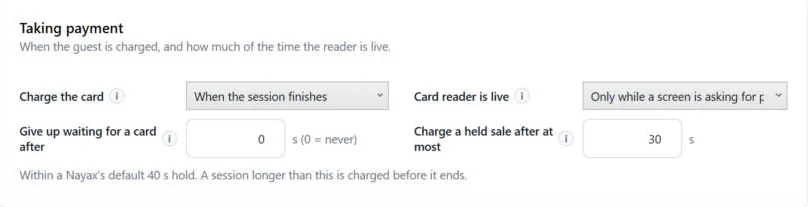
On cost, the comparison is not close over time. Business at $189 a month is $2,268 in the first year, before payment fees or extra devices. Premium, the plan that includes remote control, is $3,348. Even so, that is not an argument for the cheapest tool. It is an argument for paying for the features your booth actually uses.
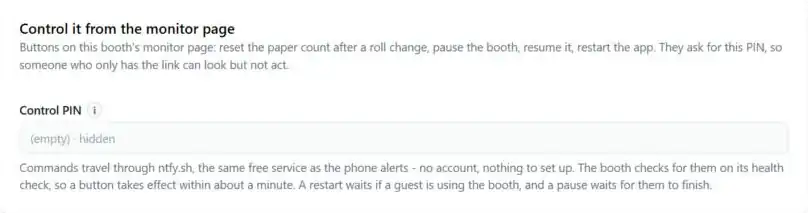
Price your booth by the print, not by the month
Build a price list, connect a card reader and open the fleet monitor on the Windows PC you already own. The trial is free and watermarked.
What you give up by leaving Snappic
Be clear-eyed about the trade. VertexBooth does not have Snappic’s AI video effects or its white-labelled cloud galleries for agency clients. Instead, AI filters in VertexBooth run on your own API key with a spend cap. That means setting up an account with the AI service yourself. Besides, a Windows PC with a DSLR is more hardware to carry than a tablet. So if your revenue comes from brand activations, those are real losses. If it comes from guests paying a booth that stands in the same place every night, they mostly are not.
Snappic pricing compared with other booth software
For context, LumaBooth’s iPad plans run about $18 a month billed yearly. Its Windows edition (formerly dslrBooth) is $17 a month yearly or $49.99 month to month. Darkroom Booth is $295 once with optional maintenance. Our full breakdown of photo booth software pricing lines these up side by side. If you are weighing a Windows option, see how Darkroom Booth software compares for unattended use.
Snappic pricing questions
How much does Snappic cost per month?
Starter is $69, Business $189, Premium $279 and Scale $399 a month. Annual billing saves 20%, and extra booth licences cost $39 to $119 a month depending on the plan.
Does Snappic charge a fee on payments?
Yes. Snappic takes 5% on subscription plans or 15% on per-event use. On top of that, Stripe adds about 2.9% plus 30 cents per transaction.
Which Snappic plan includes remote control?
LiveConnect remote control is included from Premium at $279 a month. On Business it comes only with the $79 white label add-on.
Does Snappic work on Windows?
No. Snappic runs on iPad, iPhone and Mac. For a Windows booth with a DSLR, look at Windows software such as VertexBooth, Darkroom Booth or LumaBooth for Windows.
We will keep this page current as Snappic’s plans change. If you run a permanent or unattended booth, try VertexBooth free on the PC you already have. Finally, venue owners who would rather have a booth installed and run for them are better served by our permanent photo booth installation in Florida service.