
Darkroom Booth software is one of the most established Windows photo booth programs on the market. For a lot of event operators, it is the right choice. It has been around for years and is sold as a one-time licence rather than a subscription. It also covers the features a party booth needs: stills, GIFs, boomerangs, video, green screen and sharing. If that describes your business, you can stop reading and buy it.
This comparison is for the operators it fits less well. Those are people running booths that take money from guests, often with nobody standing next to them. That is where the differences between Darkroom Booth software and newer tools like VertexBooth start to matter.
What Darkroom Booth software costs in 2026
Darkroom’s pricing page lists Darkroom Booth at $295 for a perpetual licence with one year of updates and support. After that, maintenance is $95 a year. If you let it lapse, the software keeps working; you just stop getting new versions and support. Upgrading from Booth 2 costs $195, and there is a $45 ten day temporary licence for one-off jobs.
The product is now branded by year, as Booth 2026, though the build numbers still read 3.x. The latest release at the time of writing is 3.01.1441, from 5 October 2026. It added Windows 11 improvements and AI background removal through Leonardo.AI.
What Darkroom Booth does well
Give it credit where it has earned it. According to Imaging Spectrum, which sells it, Darkroom Booth includes video and slow motion, boomerang GIFs and burst mode. Green screen, surveys and analytics are in there too. It works with almost any printer and supports panoramic prints on the DNP DS620 and DS820. Sharing covers email, text and Dropbox. Canon and Nikon cameras tether directly.
It also supports bill acceptors, which is more than many event-focused programs do. Furthermore, the perpetual licence with optional maintenance is an honest model. You pay once and you are never forced onto a subscription.
Two caveats are still worth knowing. LumaBooth’s comparison page says Darkroom does not tether Sony cameras, which matters if you shoot an a7 body. And reviews on Capterra mention support stopping after business hours, which is when most events actually run. Still, neither is a dealbreaker on its own.
Where Darkroom Booth software stops: unattended, paid booths
We went through Darkroom’s pricing, product and support pages looking for the features an unattended booth depends on. We could not find any of these documented:
- Card readers connected over MDB, such as Nayax terminals
- Pricing that changes with what the guest picks, such as more prints for more money
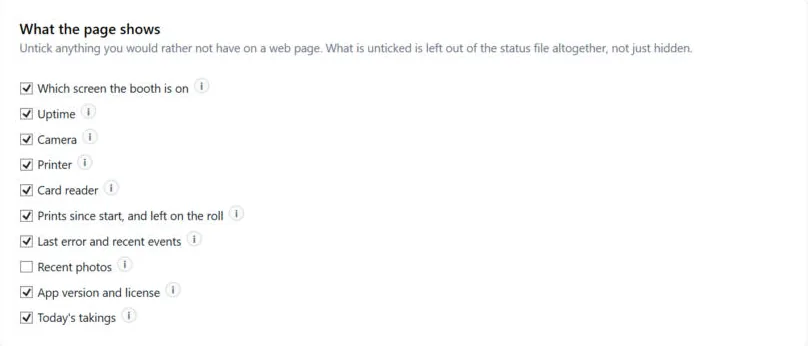
- A remote page showing every booth’s status, paper and takings
- Phone alerts when a booth faults, runs low on paper or goes offline
- Pausing or restarting a booth from somewhere else
Of course, that is not a criticism of Darkroom so much as a description of who it was built for. An event booth has an operator standing beside it who sees the paper light and hears the guest complain. A booth in a bar lobby at 11pm has nobody. The software has to do the watching.
Darkroom Booth vs VertexBooth for an unattended booth
| Darkroom Booth | VertexBooth | |
|---|---|---|
| Licence | $295 once, 1 year updates, then $95/year | $250 once (early access), 12 months of updates |
| Platform | Windows | Windows |
| Cameras | Canon, Nikon | Canon, plus Sony and Nikon in beta, webcams, HDMI capture |
| Payments | Bill acceptor | Card readers over MDB (Nayax compatible via Qibixx) |
| Price by guest choice | Not documented | Price lists and price per print |
| Remote monitoring | Not documented | Fleet monitor page plus phone alerts |
| Remote control | Not documented | Pause, resume, restart, reset paper count |
| Two printers | Any printer | Printer swap when the first roll runs low |
| Video | Yes, mature | Short video sessions |
| Green screen | Yes | Not yet |
So read the table both ways. Darkroom is the more mature product for effects, and its Nikon support is proven where ours is labelled beta. VertexBooth is built around the problems of a booth that trades on its own.
Charging by what the guest picks
VertexBooth 1.4 lets a button remember what the guest chose. For example, buttons reading 2, 4 and 6 can save how many prints the guest wants. The payment step then charges from a price list (2 prints $4, 4 prints $8, 6 prints $10, say) or a price per print. If a price cannot be worked out, the card reader is never asked and Studio tells you why. Guessing a price is the one thing a paid booth must never do.
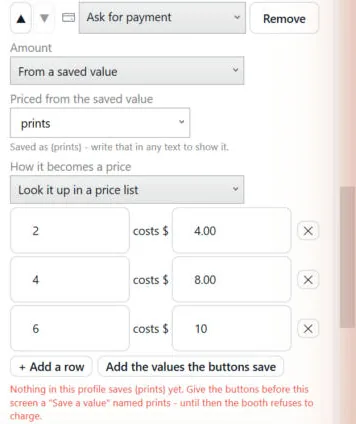
A card reader that charges only what was confirmed
The card reader code was rebuilt in 1.3 around what the terminal actually confirms. Now a sale is charged only once the reader confirms it. A guest who walks away mid-session is refunded rather than charged, and each approval is its own sale. Our page on photo booth software card payment covers the hardware side.
Watching and controlling the booth from your phone
The fleet monitor is one private web page for all your booths. It shows status, devices, paper, the last guest, today’s sessions, prints and takings. With a control PIN set, you can stop or restart trading on a booth from that page. You can also relaunch its app, or zero the paper count after a reload. It is written to your own cloud storage, so there is no monthly dashboard fee from us. Phone alerts cover faults, low paper, declined cards and a booth that has stopped checking in.
See the unattended features on your own PC
Install the free watermarked build beside your current software, then set up a card price list and a private monitor page.
Which one should you buy?
Buy Darkroom Booth if you run mobile events with an attendant or want green screen today. The same goes if you shoot Nikon, or value a long track record over new features. It is good software at a fair price, and the maintenance model is reasonable.
Pick VertexBooth if your booths take card payments, run unattended, or sit somewhere you cannot see them. That is the job we built it for. We place and run permanent booths ourselves, so we needed software that could watch them for us. If you are also weighing dslrBooth, our Darkroom Booth vs dslrBooth comparison covers that pairing.
Either way, test before you pay. Darkroom sells a cheap ten day licence, and VertexBooth has a free watermarked download with no account. Build your real booth on both and the decision tends to make itself.
Darkroom Booth software questions
How much is Darkroom Booth software?
$295 buys a perpetual licence with one year of updates and support. After that, maintenance is $95 a year if you want new versions. A ten day licence is $45.
Does Darkroom Booth work on Mac?
No. Darkroom Booth is Windows only. Darkroom sells a separate iPad app on a subscription.
Does Darkroom Booth support card readers?
Its product pages list bill acceptor support. We could not find card reader or MDB support documented, so ask Darkroom directly if you need it.
Is there a Darkroom Booth alternative without a subscription?
Yes. VertexBooth is a one-time licence for Windows, aimed at unattended and card-paying booths, with a free watermarked trial.
We would rather lose a sale to Darkroom than sell VertexBooth to an operator it does not fit. If your booths run unattended, though, download the free trial and put it through a real night. Meanwhile, venue owners who want a booth without running any software should see what permanent photo booth installation in Florida involves for a venue.