


Do photo booths need WiFi? Not to take pictures or print them. A photo booth with a camera, a PC and a printer runs perfectly well with no internet at all. What needs WiFi is everything that leaves the room. That means photos sent by text or email, cloud galleries and QR codes that link to the web. It also covers AI filters and any payment that happens on the guest’s phone.
That split is the whole answer for a party booth with an attendant. For a booth where guests pay to get their photos sent, it is only the start. The hard part is not what happens when the internet works. It is what the booth does in the minute after it stops.
What a photo booth can do without WiFi
The core loop is entirely local. The camera talks to the PC over USB, and the PC talks to the printer the same way. Nothing in between needs the internet. As a result, most booth software, ours included, will run a full night offline if all you hand out is prints.
| Feature | Needs internet? |
|---|---|
| Taking photos, GIFs and boomerangs | No |
| Printing strips or 4×6 prints | No |
| A card reader wired to the booth | The reader needs its own connection, the booth does not |
| QR code served from the booth itself | No, but the guest’s phone must be on the same network |
| Text message and email delivery | Yes |
| Cloud gallery and lasting photo links | Yes |
| AI filters and backgrounds | Yes |
| Remote monitoring and phone alerts | Yes |
However, the QR row trips people up. VertexBooth can serve a photo straight from the booth PC over the local network with no cloud account. That works when guests can join the same WiFi. It is common at a private event and rare at a public venue. If the venue network has no internet behind it, the local QR still works. If the guest is on cellular data, it does not.
How photo booth software usually handles a dead connection
The standard answer is a queue. Simple Booth says in its help center that emails, texts and uploads that cannot go out are queued. They are sent once the connection returns. Snappic says capture and printing continue offline and queued uploads resume when the iPad reconnects. LumaBooth and Breeze work the same way. Breeze also offers an offline email mode that sends everything at the next startup.
For an event with an attendant, that is the right design. The host wants the photos and the guests will get them tonight or tomorrow. Meanwhile, the attendant can tell people why their text has not arrived yet.
Where a queue breaks: booths that charge for delivery
Now picture an unattended booth in a bar. The guest pays for a session and taps Text me my photos. The venue WiFi has dropped. A queue still accepts the phone number, the screen says sent, and the guest walks off happy. Their text arrives three hours later, after they have gone home. Or it never arrives, because the booth was restarted before the connection came back.
Worse, nobody in the room can explain what happened, because nobody is in the room. The guest paid for something the booth knew it could not deliver at that moment. That is a refund request at best and a one star review at worst. So, do photo booths need WiFi when they sell digital delivery? Yes. At the very least, the booth has to know the moment it does not have it.
What VertexBooth does when the internet goes down
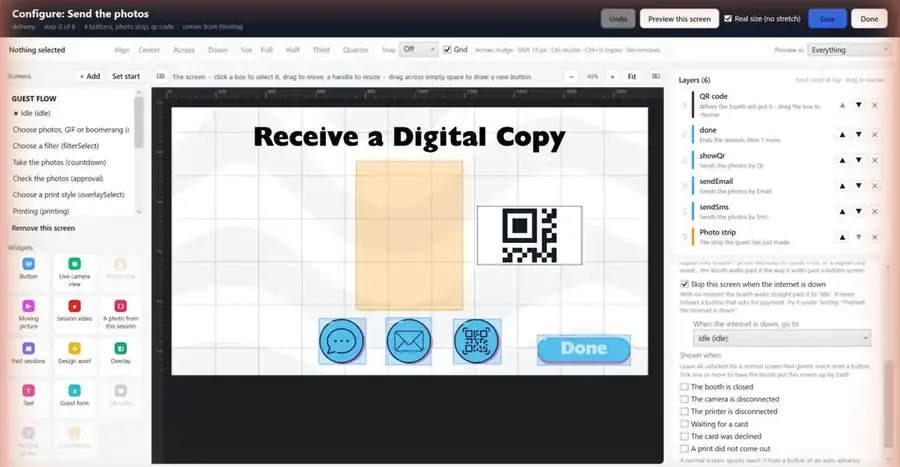
VertexBooth 1.4 took the opposite approach to a queue: do not sell what cannot be delivered. Any screen in a booth’s flow can be marked Skip this screen when the internet is down. Then you choose where the booth goes instead. Mark the screen that sells photos by text and point it at the print screen. With no internet, the booth simply walks past it. In other words, guests see the options that work right now and nothing else.
Still, a few rules make this safe to rely on:
- It checks for real internet, not just WiFi. A booth connected to a hotel network that is still waiting on a login page has WiFi and no internet. Studio’s Internet line now says exactly that, and the skip treats it as down.
- It never skips onto a payment. The detour will not follow a button that asks for payment. Therefore an outage can never route a guest into being charged.
- You can rehearse it. Under Testing, Pretend the internet is down runs the whole flow as if the connection had dropped, without unplugging anything.
- Pre-flight checks the detour. Before the doors open, the check flags a skip with nowhere to go.

Sometimes a send fails anyway, because the connection drops between the guest choosing text and pressing send. In that case the booth says it could not send that photo. It then keeps the guest on the delivery screen to pick another option, such as a print or a QR code. It does not pretend the text went out. To be clear about the trade-off: VertexBooth does not queue failed texts to send later. For a paid, unattended booth we think an honest “try another option” beats a promise the booth may not keep.
Rehearse an outage before a guest finds it
Mark your internet-only screens, switch on Pretend the internet is down, and walk the booth yourself. Free watermarked trial, no account needed.
Knowing when a booth drops offline
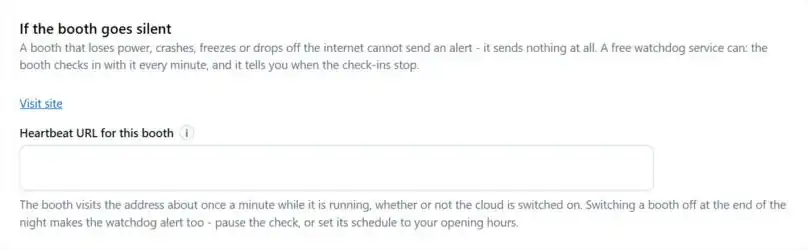
The awkward thing about a booth losing its connection is that it cannot tell you so. After all, it has no internet to send the message with. VertexBooth handles that with heartbeat alerts. You paste a free healthchecks.io link under Monitoring and the booth checks in on a schedule. When the check-ins stop, you get told. So it covers a power cut, a crash and a dead router. Those are the failures a booth can never report itself. Our post on vending machine downtime goes further into catching outages before guests do.
Getting a reliable connection at a venue
Software can make an outage graceful. It cannot make venue WiFi good. When operators ask whether photo booths need WiFi, they usually mean something else: can they trust the venue’s? Three habits help more than anything else.
First, use a cable when you can. A permanent booth near a network port should be wired. Most venue managers will run a cable if you ask before install day rather than after. Second, avoid guest networks with a login page. They drop sessions on a timer and come back asking for an email address, which a kiosk cannot answer. Instead, ask for a staff network or a dedicated one. Third, consider a cellular hotspot as a backup for booths that sell digital delivery. It costs a monthly plan, and in exchange the venue’s network stops being your problem.
For mobile events, do the reverse of what feels natural. Decide what the booth offers based on the connection you can prove on the day, not the one the venue promised. Setting up QR sharing? The photobooth software with QR code walkthrough explains which kind of link survives a bad network.
Do photo booths need WiFi? Common questions
Does a photo booth need WiFi to print?
No. Printing happens over the USB cable between the booth PC and the printer. A booth with no internet can print all night.
Can guests get digital copies without internet?
Only from a QR code served by the booth itself. Even then, their phone must be on the same local network. Texts, emails and cloud links all need internet.
What happens to a text message if the WiFi drops?
That depends on the software. Most queue it and send it later. VertexBooth skips screens that sell internet-only delivery while the connection is down. If a send still fails, it asks the guest to pick another option instead of saying it was sent.
Do photo booths with card readers need WiFi?
The booth does not. However, the card reader needs its own connection to approve payments. Many unattended terminals carry a cellular connection for exactly this reason. Check the terminal, not the booth.
So which of your booth’s screens would a guest still pay for if the WiFi died right now? If the answer is “the text one”, it is worth an afternoon in VertexBooth with the internet switched off. Would you rather have a booth in your venue without managing any of this? The permanent photo booth installation in Florida overview explains how we take it off your hands.