


DNP printer paper is sold as a matched set: a roll of paper and a ribbon, packed together and meant to run out together. How many prints you get depends on the printer model and the size you print, and the spread is wide. A DS-RX1HS roll makes 700 prints at 4×6, while a QW410 roll makes 150. Printing 2×6 photo strips doubles whatever the 4×6 number is, because the printer cuts each 4×6 sheet down the middle.
Below are the yields for the DNP printers photo booth operators actually use, plus what the common paper errors mean. Then comes the part most guides skip: how to keep a booth printing when one roll ends in the middle of a busy night.
DNP printer paper by model
These figures come from the media listings at B&H and the printer pages at Imaging Spectrum. Each box holds two rolls, so the case total is double the per-roll figure.
| Printer | 4×6 prints per roll | 2×6 strips per roll | Rolls per case |
|---|---|---|---|
| DNP DS-RX1HS | 700 | 1,400 | 2 |
| DNP DS620A | 400 | 800 | 2 |
| DNP DS40 | 400 | 800 (needs the cutter guide) | 2 |
| DNP QW410 | 150 | Not a strip printer | 2 |
The RX1HS is the workhorse for a reason. One roll covers a long weekend of events. At the time of writing, the 4×6 media set listed at B&H for about $200. The DS620A is faster per print, at 8.3 seconds against 12.4 for a 4×6. So it suits a line that never stops, but you will reload it almost twice as often.
Why strips double the count
A 2×6 strip is half of a 4×6 sheet. The printer prints two strips side by side and its cutter splits them. That is why a photo booth that hands out strips gets 1,400 from an RX1HS roll instead of 700. On the DS40 this needs DNP driver 3.2 or later and the cutter guide fitted. Get the paper size wrong in the driver and the sheet comes out uncut. It looks like a printer fault, but it is not one.
Paper and ribbon are one set
DNP printer paper and ribbon are matched by a chip, so you change them together. The DS-RX1 and RX1HS manual spells this out. The ribbon’s IC chip carries unique information, so mixing a fresh ribbon with a half-used roll produces a mismatch error. The habit that saves a night is simple. Never top up one half of the set.
The errors operators search for most often mean roughly what they say:
- Paper End: the roll is finished. Load a new set.
- Ribbon End: the ribbon is finished. Because paper and ribbon come as a set, this should arrive at about the same moment as Paper End.
- Paper Jam: pull the paper out and cut off any wrinkled or half-printed part straight across with scissors. Then reload.
- Ribbon Error: the ribbon is seated wrong. Take it out and set it again.
None of these are hard to fix with someone standing next to the printer. The trouble is that in an unattended booth nobody is.
Knowing how much paper is left
DNP does offer tools that read the count. The PrinterInfo utility shows remaining media on the DS40, DS620A, DS820 and DS-RX1. The RX1HS also has a status app that reads the ribbon chip. Both are useful on a bench. However, the PrinterInfo instructions say not to run it while the printer is printing. Neither tool tells you anything when you are across town, either.
That is why VertexBooth keeps its own paper count. Under Print you enter how many prints a full roll makes. Then you press New roll loaded when you reload, and the booth counts down with every sheet. The monitor page shows paper for every booth. Two of the phone alerts cover exactly this: paper running low and paper out. The low paper alert fires with about a tenth of the roll left, while there is still time to drive over.
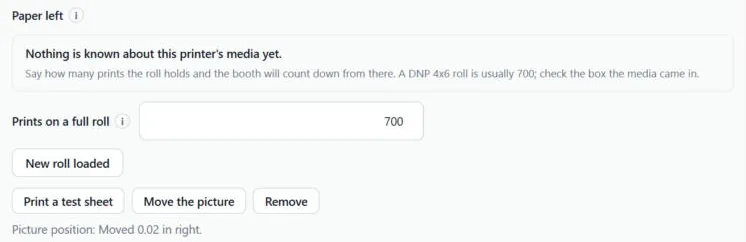
If you run a booth somewhere you are not, remote monitoring is what makes that count useful. It turns a number on a screen into a text on your phone.
Stacking two DNP printers so the booth never stops
Here is where most photo booth software leaves you on your own. Plenty of operators put two printers in one cabinet, both loaded with the same DNP printer paper. That way a busy location runs twice as long between visits. The hardware part is easy. The software part usually is not. Either you split prints between the printers by design or by button, or you set one as the default and switch by hand when it empties.
VertexBooth 1.4.1 added a printer swap for exactly this setup. Once two printers are in use, the Print page offers one rule. When the first printer has a chosen percentage of its paper left, print on the second one instead.

A few details matter in practice. The swap is decided before every print, from the booth’s own count. As a result it catches every print bound for that printer: the default, a print design, a Print button, and reprints too. When you reload the first printer and press New roll loaded, prints go back to it with no other step. The booth also refuses to guess. If the first printer has no roll size set, no swap happens. The same goes for a second printer that is off, unplugged or counted empty, and the pre-flight check tells you why before the doors open.
So the routine for a two-printer cabinet is short. Load both, press New roll loaded on both, and set the swap at 10%. Then let the phone alert tell you when the second roll is getting low.
Run two printers without babysitting them
Set a roll size, a swap rule and a low paper alert, then leave the booth alone. The trial is free, watermarked, and needs no account.
Strips that print at their exact size
The other DNP complaint you hear constantly is about margins. One strip comes out with a white edge and the other does not. Or the bottom of the design is trimmed more than the top. A lot of that comes from software enlarging the design slightly to fill the printer’s page. That pushes the outer edges into the trim.
Since version 1.3.1, VertexBooth prints photo strips at their exact size instead. Where the printer’s trim does bite, it cuts into your design’s own border color rather than white paper. For printers that sit a hair off center, each printer under Print has a Move the picture button. You nudge the design with the arrows and watch close-ups of every edge and the cut line. Then print a test and save. The setting belongs to that printer on that PC, so it survives switching profiles.
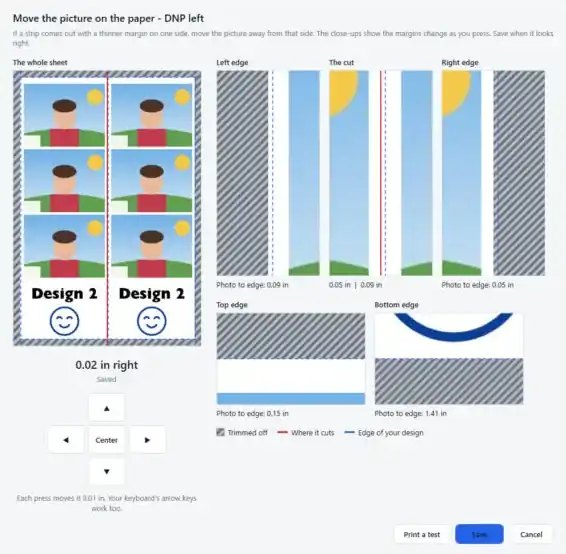
Test prints also say when a printer is off, unplugged or set to offline. Before, they reported success while the job waited in the Windows queue. Small thing, but it is the difference between a five second fix and a ten minute hunt. For layout itself, our guide to photo booth strip design covers sizes and bleed.
Buying DNP printer paper without overbuying
Work backwards from sessions, not from events. If your booth prints two strips per session on an RX1HS, one roll covers about 700 sessions. A placement doing a few hundred sessions a month needs roughly one roll a month, and one case covers two. For a mobile operator running a four hour wedding, one roll is usually plenty. Still, carry a spare set in the case. A sealed set costs far less than a dead printer in front of a line.
Buy media for the printer you own. Each DNP model takes its own media, so DS620A paper will not load into an RX1HS. Still choosing a printer? Our comparison of photo booth printers covers speed, cost per print and which models suit strips.
DNP printer paper questions
How many prints does a DNP roll make?
It depends on the model. A DS-RX1HS roll makes 700 4×6 prints or 1,400 2×6 strips. A DS620A or DS40 roll makes 400 at 4×6, and a QW410 roll makes 150. Cases hold two rolls.
Can I print 2×6 strips on 4×6 DNP paper?
Yes. The printer prints two strips on one 4×6 sheet and cuts them apart. So your strip count is double the 4×6 count. Pick the 2×6 setting in the driver, and on a DS40 fit the cutter guide.
Why do I have to replace the paper and ribbon together?
The ribbon carries a chip that is matched to its paper roll. Loading a new ribbon with an old roll causes a mismatch error. That is why DNP tells you to change the media as a set.
How do I know when a booth is about to run out?
Either check the DNP utility at the machine, or let the booth software count. VertexBooth counts every sheet against the roll size you enter. It sends a phone alert when paper is low and again when it is out.
Paper is the one part of a photo booth that is guaranteed to run out. The only real question is whether you find out from your phone or from a guest. If you would rather not think about rolls at all, permanent photo booth installation in Florida means we load them for you.